
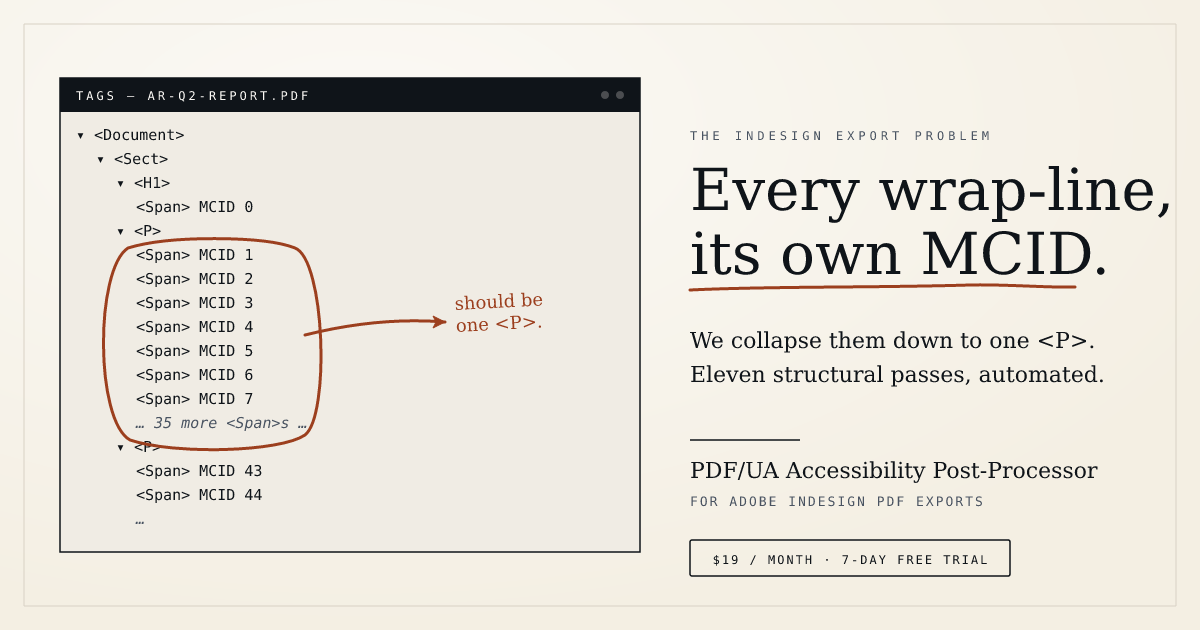
If you’ve remediated a tagged PDF exported from Adobe InDesign, you know the drill. The file opens in Acrobat, you open the Tags tree, and the next hour is mousework — re-parenting paragraph fragments, flattening redundant <Span> wraps, scoping table headers, wrapping stray decorative paths as artifacts. It’s work that needs doing, but none of it needs a designer’s judgment. And every time the client sends edits, you re-export and do it all again.
We’ve built a tool that automates those cleanup steps. It’s called the PDF/UA Accessibility Post-Processor, and it’s available today as a separate product from ACHECKS, at achecks.org/indesign-pdf-accessibility.
How it works. Upload your InDesign-exported tagged PDF. Before anything is modified, the tool opens the file read-only and shows you a pre-flight audit: which PDF/UA checks already pass, which it will fix for you, and which need a decision from you — language, document title, per-table header scoping where relevant. Nothing changes until you confirm. On the configure screen, every automatic pass carries an “Apply this fix” checkbox — uncheck any you’d rather handle yourself. The mandatory PDF/UA baseline (language, XMP metadata, parent-tree integrity) always runs.
What the passes cover. Paragraph MCID merging — word-wrapped paragraphs that InDesign ships as one marked-content block per visual line, collapsed back to a single <P>. Redundant <Span> flattening that preserves Spans with real metadata (/Alt, /ActualText, /E). Tag-tree cleanup that prunes empty tags, trims whitespace-only paragraphs, dedupes references, and artifact-wraps orphan content. Table header scoping (Row, Column, or Both, per table). <Table>-inside-<P> unwrapping. Lifting placed graphics out of paragraph wrappers that only exist to frame a figure — the PAC 2024 “Possibly inappropriate use of a Figure” finding, gone. Bookmark generation from your heading structure with ToUnicode support for non-ASCII languages. /Form struct-tree reordering so tab order matches reading order. A medium document finishes in about a second. You choose download, email, or both. Uploaded files are deleted as soon as the delivery completes.
What it doesn’t do — and this matters — is make your PDF accessible. Accessibility is a judgment about the whole document: correct semantic tags, meaningful alt text, a logical reading order, sufficient colour contrast, plain language. Those decisions belong to the author, and most of them have to happen in InDesign before export. The Post-Processor doesn’t guarantee PDF/UA-1, WCAG 2.1 AA, Section 508, or AODA compliance, doesn’t repair a wrong reading order, doesn’t add alt text, and doesn’t OCR scanned pages. After processing, you still run your own validation — PAC 2024, Acrobat’s checker, axe for PDF, or assistive-tech testing — and fix anything that remains.
What it does do is eliminate the repetitive part of the work. The passes are the same ones an experienced remediator runs by hand, automated and applied consistently across every export — and you get to choose which ones run.
If you’re working with InDesign-exported PDFs regularly, the 7-day free trial will tell you in an afternoon whether it’s worth keeping. Start here.